


JusTalk - Video Chat & Calls
4.638.71K Reviews
App Specs
- Version
- 8.14.4
- Updated On
- License
- Free
- Downloads
- 10,000,000+
- Developer
- JusTalk
- Categories
- Communication
- Platform
- Android, iOS
Screenshots





 Analysis by AppCompare
When a call fails to start, it is tempting to blame the app immediately. I’d first check whether the other person is ready to answer, whether the connection is stable, and whether both people are opening the same messaging service. That simple pause can save time: a communication app is only useful when both ends of the conversation can reach it.
JusTalk - Video Chat & Calls is a communication app from JusTalk for text, voice, and video conversations, including group hangouts. It is free to install, rated for Everyone, and has an average rating of 4.6 from around 313,000 ratings. That scale suggests it has found a broad audience, but popularity alone does not tell me whether it fits a particular household or friend group. The more useful question is whether the people you want to contact are willing to use it too.
Where calls and messages can get stuck
The first practical hurdle is coordination. If your friends already use another messenger every day, asking them to install a separate app just for occasional calls may add friction rather than remove it. JusTalk makes the most sense when a regular group agrees to use it, or when its call-focused approach gives you a reason to keep it alongside your usual chat app.
Group conversations bring their own small challenge: the best time to call is not always the time everyone is free. I’d use text to settle on a moment, then move into a voice or video call when people are ready. That is a more dependable routine than expecting everyone to notice an incoming group call at once.
Setup checks that make a difference
The app is available for Android and iOS, which makes it easier to include friends or relatives who use different kinds of phones. Before relying on it for an important conversation, I’d install it, complete the account setup, and try a short call with someone I know. That first test is a good way to catch login or connection confusion before a planned family catch-up.
JusTalk is free to download, with in-app purchases priced from $0.99 to $119.99 per item. I’d treat optional purchases as a separate decision rather than something needed just to assess the basic communication experience. The current version is 8.12.1 and requires Android 6.0 or later; the app first appeared on February 19, 2014, so it is not a brand-new service.
A recovery routine for a missed call
If a call does not connect, I would avoid repeatedly tapping the call button. Send a quick message first, confirm that the other person is available, and then try again. If the problem continues, close and reopen the app, check the phone’s network connection, and test whether another call or ordinary internet service works. This approach helps separate a temporary connection hiccup from a problem that needs more attention.
Worth Reading Before You Choose

EA SPORTS FC Mobile 26 Is a Bigger Football Game, but It Takes Time

Flipboard Shows What News Apps Must Do Beyond the Feed

Switching to Android Auto Means Rethinking Your Driving Routine

Google Calendar Makes a Crowded Week Easier to Manage

Ludo King Makes the Most of the Minutes Between Plans

Baby Panda World Brings Quick Play to Modern Phones, but Its Game Library Feels Busy
For a group hangout, it also helps to agree on a backup plan before everyone joins. If one person cannot get the video working, switching to voice or continuing by message can keep the conversation moving. The point is not to make every call perfect; it is to avoid letting a small technical snag derail the whole get-together.
When the problem may be elsewhere
Video depends on more than the app itself. A weak or busy network, a phone under heavy load, or an issue on the other person’s device can all affect a call. If the picture freezes, I’d first try moving to a steadier connection and closing other demanding apps. If only one contact has trouble reaching me, I’d ask them to test their own connection before assuming my account is the cause.
Privacy matters in any messenger, especially when a conversation includes personal details. JusTalk describes group chats and end-to-end encryption among its features, which is reassuring for that use, but I still would not treat any app as a reason to share sensitive information casually. I’d also think carefully before adding people to a group: a lively family chat is useful only when its membership and purpose are clear.
What’s JusTalk All About?
You know how sometimes you just want a straightforward app that does its job without all the fuss? That’s where JusTalk steps in. It’s primarily designed for video chatting and voice calls, but it brings a bit of flair to the table. The developers have kept things simple, yet loaded with features that make your conversations more engaging. It’s available on both Android and iOS, which means you can easily chat with pretty much anyone.
User Experience and Interface
Upon downloading, the first thing you’ll notice is how clean and intuitive the interface is. Everything is laid out in a way that just makes sense. You’re not going to be fumbling around trying to find basic features. The sign-up process is a breeze too, and you’re up and running in no time.
The app’s design is sleek, with a nice balance of colors that are easy on the eyes. I appreciate how the developers have kept the clutter to a minimum, which is a big win in my book. It’s straightforward enough for even the least tech-savvy folks among us.
Features That Stand Out
Alright, let’s dive into what makes JusTalk tick. At its core, you’ve got high-quality video and voice calls. The quality of the calls is pretty impressive, even with my less-than-stellar Wi-Fi connection. There’s minimal lag, and the video quality holds up well, which is crucial for those late-night catch-ups with friends.
But wait, there’s more! JusTalk spices things up with features like doodling during calls. Yes, you heard that right. You can literally draw on the screen while chatting, which adds a fun, personal touch to your conversations. And if you’re in the mood for some karaoke or sharing your favorite tunes, the app lets you play music during calls too.
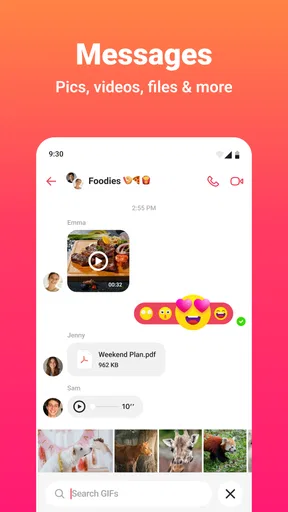
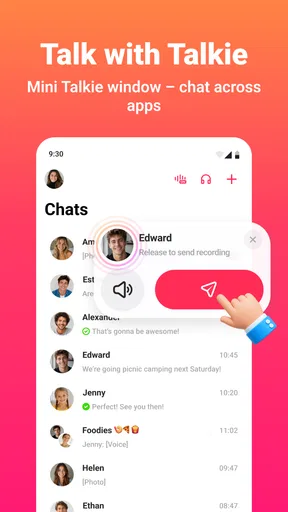
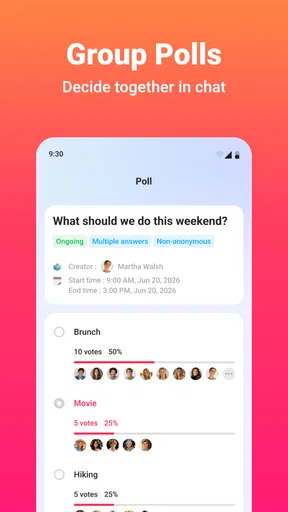
Then there’s the group chat feature. You can easily create groups for family, friends, or coworkers. Plus, the app offers end-to-end encryption, so you know your chats are secure.
Why Choose JusTalk?
So, what makes JusTalk stand out from the sea of other communication apps? For starters, it’s the combination of simplicity and functionality. You’re not just getting a barebones app; instead, you have something that’s easy to use but also packed with features that make your conversations more lively.
Another thing I love about JusTalk is its cross-platform availability. Whether your friends are on Android or iOS, connecting is seamless. Plus, the app doesn’t hog your data plan, which is a huge plus if you’re always on the go.
Getting the Most Out of JusTalk
To really get the most out of JusTalk, I recommend exploring all the little features it offers. Try out the doodling, send some stickers, and play around with the music sharing. These little touches add a layer of fun that’s often missing in other apps.
And don’t forget to set up your profile with a cool picture and status. It’s a small detail, but it makes your presence feel more personal in the app.
Plus, with the app’s continual updates, you’ll find new features popping up regularly. It’s always nice to see an app that evolves with its users’ needs.
Final Thoughts
In the end, if you’re looking for a no-nonsense app that delivers solid video and voice calls with a hint of fun, JusTalk - Video Chat & Calls might just be your new favorite. It’s reliable, easy to use, and comes with enough bells and whistles to keep things interesting.
For a typical evening call, I can see the appeal: a parent wants to catch up with relatives, a friend joins from another phone platform, and doodling gives children something to do while the adults talk. The practical advantage is that a video call can feel more like a shared visit than a string of messages. The trade-off is that everyone needs the app and a workable connection, so it is less convenient for a one-off call than a service already installed by the whole group.
Compared with a basic messaging app, JusTalk puts more emphasis on live conversation and playful call extras. Compared with a dedicated meeting tool, it feels better suited to informal catch-ups than structured work sessions. If your priority is a familiar, universally adopted messenger, the app your contacts already use may be the better choice. If you want a more social video chat with doodling and music sharing, JusTalk has a clearer reason to earn a place on your phone.
Who is likely to enjoy it—and who may not
I’d recommend trying it if you have relatives or friends who are happy to make it a shared habit, especially if some of them use Android while others use iOS. It can also suit people who find plain voice calls a little flat and like having light ways to interact during a video conversation. Group chats make it practical for recurring family or friend circles, rather than only one-to-one catch-ups.
I would skip it if you need to contact people who will not install another messenger, or if your main need is formal meetings with work-oriented controls. It is also not the answer to every poor-call problem: if your network is unreliable, switching apps may not improve the connection. For that situation, a voice call or a later conversation on a steadier network is the more sensible workaround.
Small habits that improve a real call
One useful trick is to keep the first call low-stakes. Test with a friend who can tell you whether your voice and picture are clear, then adjust your position or connection before using it for a longer conversation. This also lets you learn where the call controls are while there is no pressure to keep a group waiting.
For family hangouts, agree on a simple order: send a message to gather everyone, start the group call once people respond, and switch to voice if video becomes distracting or unstable. Doodling and music are best treated as optional accents, not the purpose of every call. That keeps the conversation accessible to relatives who may prefer a quieter, more direct chat.
If you are deciding whether the free download is enough for your needs, start with the way you actually communicate rather than browsing purchases first. Try the calls and messages with the people you expect to contact, then decide whether any optional item offers something you personally want. The range of in-app purchase prices is broad, so I would check each item carefully and avoid assuming that spending is required for ordinary use.
My practical verdict
JusTalk has a distinct personality: it keeps the core idea of calling and messaging approachable, then adds playful touches that can make a conversation feel less routine. I like it most as a shared app for a group that already wants to see and hear one another regularly. Its best qualities show up when everyone is prepared to join, not when you are trying to persuade a reluctant contact at the last minute.
With more than 10 million installs, it is an established option, but I would still choose based on the people I need to reach and the way they prefer to communicate. The Everyone age rating makes it broadly accessible, though families should still make their own decisions about children’s use and group membership. For casual calls across Android and iOS, I think it is worth a try; for maximum convenience with an existing contact list or for formal meetings, I would stick with the service that already fits that routine.
So go ahead, give it a shot, and let me know what you think. I’ve been having a blast with it, and I bet you will too. Happy chatting!
Pros
- High-quality video and audio calls.
- User-friendly and intuitive interface.
- Supports group video calls seamlessly.
- Fun doodling feature during calls.
- Cross-platform availability.
Cons
- Occasional connectivity issues.
- Some features require in-app purchases.
- Ads can be intrusive at times.
- Limited customization options.
- Battery consumption is high during video calls.
FAQs for JusTalk - Video Chat & Calls
What is JusTalk and how does it work?
JusTalk is a versatile video chat and calling app available for both Android and iOS. It offers high-quality video and voice calls, allowing users to connect with friends and family easily. The app also includes features like group chats, doodling during calls, and sharing photos, making it a comprehensive communication tool.
Is JusTalk free to use?
JusTalk offers a free version with access to most of its core features, such as video and voice calls. However, there are optional in-app purchases and subscriptions that provide additional features, like ad-free usage and more customization options. Users can choose to upgrade to enhance their experience if desired.
How secure is JusTalk for my personal data?
JusTalk prioritizes user security and privacy. It employs end-to-end encryption for all calls and messages, ensuring that your conversations remain private. The app also complies with international data protection regulations, offering users peace of mind regarding their personal information.
Can JusTalk be used for group calls?
Yes, JusTalk supports group video calls, allowing users to connect with multiple people simultaneously. This feature is ideal for virtual gatherings, meetings, or family chats. Users can easily add participants to a call and enjoy a seamless group communication experience without significant quality drops.
Does JusTalk work on all devices and networks?
JusTalk is compatible with both Android and iOS devices, making it accessible to a wide range of users. The app is designed to work smoothly on various network types, including Wi-Fi, 3G, 4G, and 5G. However, for the best performance, a stable internet connection is recommended.


